
Intro #
More than 2 years ago with a lot of searching/patching/searching/patching etc., I finally had a working kernel with my AMD Radeon R9 290. I had some artifacts, but after multiple nights patching I was able to play the game Factorio on my board (with box64).
But I didn’t save my changes/patches and wiped the directory. I still had some in my git repo and tried to get it working again… but gave up.
Now it is 2 years later, and the mainline Linux kernel (7.2, and now 7.3) has support for a lot of the board and the PCI-e controller, so I did give it a try. Too bad, AMDGPU was not working. So I asked claude what is missing and how it can be fixed. I don’t expect a real answer. But he gave me one. Here it started!
Setup #
I have a smart-plug and Home Assistant, so with a token Claude can power the device on and off.
I have a USB to serial, so it can send commands to U-Boot.
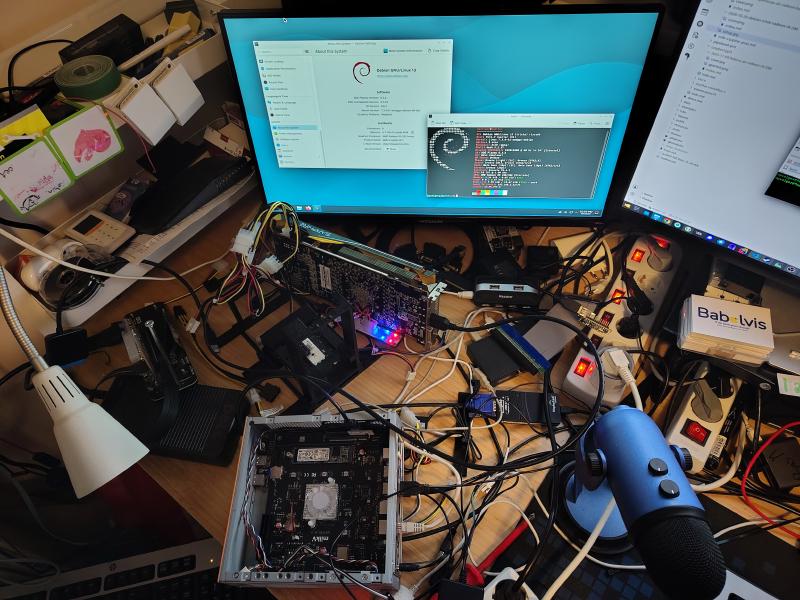
I started a tftp server with docker, so it can download the kernel that is made after compiling.
I copied the root partition of my StarFive VisionFive 2 to an eMMC.
I compiled U-Boot with my ansible script. I commented out some stuff, so only U-Boot was created on my SD card. You can also use the latest vendor U-Boot.
I used the kernel Claude built for me and booted. See all the steps in my markdown.
setenv serverip 192.168.2.34
setenv fdt_addr_r 0x31000000          # fdt_addr_r does not exist in the env
tftpboot ${fdt_addr_r} ${serverip}:arch/riscv/boot/dts/spacemit/k1-milkv-jupiter.dtb
tftpboot ${kernel_addr_r} ${serverip}:arch/riscv/boot/Image.gz   # ~20 MiB/s
setenv bootargs 'root=/dev/mmcblk0p1 rw swiotlb=131072 console=tty0 console=ttyS0,115200 earlycon rootwait stmmaceth=chain_mode:1 selinux=0 radeon.cik_support=0 amdgpu.cik_support=1'
booti ${kernel_addr_r} - ${fdt_addr_r}
It booted to the login, but no GPU! PCI-e failed with failed to parse root port. So I wrote down how claude can control all of this, and watched some TV.
When I was back, there was a working AMDGPU! I had a console! Logged in and installed KDE Plasma! Rebooted and logged in. Artifacts!!!
I have an HDMI capture card and let Claude use it to capture the artifacts. So now I had to watch some YouTube on my computer and log in to see if the artifacts were gone.
It worked, I now had no artifacts. So now I gave him the task to use the same config as a Debian kernel. It built, and that one can boot too. It was only unstable :(
After a night of trial and error, Claude found the problem: performance-governor was the solution, the schedutil cpufreq governor was not stable. So now full power!
Kernel with PCI-e support #
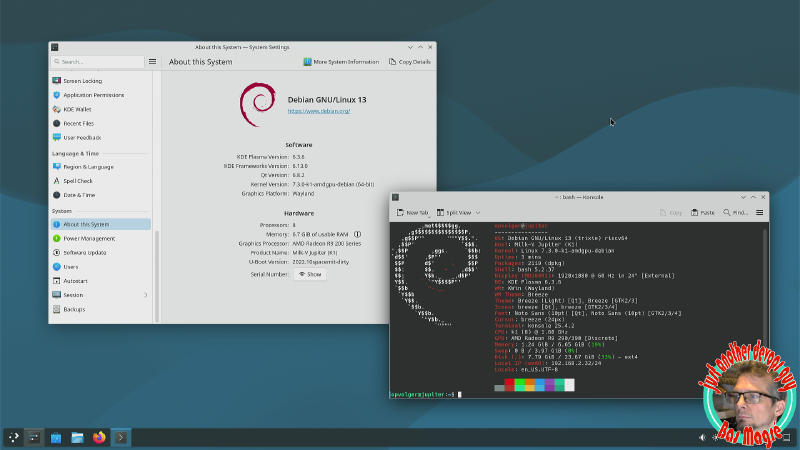
So I now have a mainline kernel (7.2 and 7.3) with AMDGPU support (for my GPU, maybe more). In the future I will test my other (AMD) GPUs.
What isn’t working is my NVMe disk :(
Claude also can create a pipeline in 5 minutes, so here are the kernels: release v1.0.0
GitHub Repo #
To not lose all the patches this time, I created a repo (with Claude’s help) linux-kernel-jupiter-1.
Here you can see all the commands and trial-and-error runs.
So now what? #
I will test some games with Box64 and FEX?
Try Steam with the new 64-bit application?
I will see!
Maybe let claude create a pipeline that gives a trixie setup for Milk-V Jupiter with an AMDGPU? So everybody can do this easily?